Beginner English as a second language Quizzes, Interactive Mind Map based on
2,000+ ESL/EFL
Conversations on Different Topics, Practice "Speaking" English with an
Online Robot.
ESL (English as a second language), ESOL (English for speakers of other
languages), and EFL (English as a foreign language) all refer to the use or
study of English by speakers with a different native language.
The many acronyms used in the field of English teaching and learning may be
confusing. English is a language with great reach and influence; it is taught
all over the world under many different circumstances. In English-speaking
countries, English language teaching has essentially evolved in two broad
directions: instruction for people who intend to live in an English-speaking
country and for those who don't. These divisions have grown firmer as the
instructors of these two "industries" have used different terminology, followed
distinct training qualifications, formed separate professional associations, and
so on. Crucially, these two arms have very different funding structures, public
in the former and private in the latter, and to some extent this influences the
way schools are established and classes are held. Source:
Wikipedia English as a foreign or second language
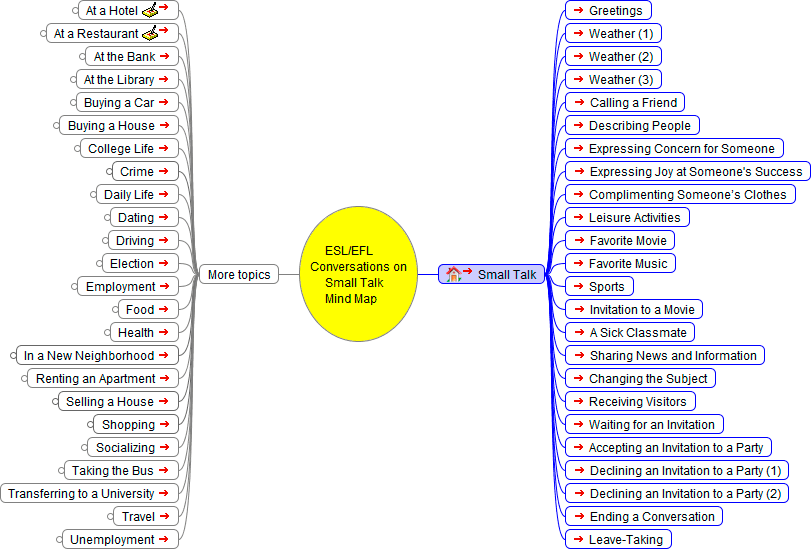
Small Talk
Small talk is conversation for its own sake, or "…comments on what is perfectly obvious." It is an informal type of discourse that does not cover any functional topics of conversation or any transactions that need to be addressed. The phenomenon of small talk was initially studied in 1923 by Bronisław Malinowski, who coined the term phatic communion to describe it. The ability to conduct small talk is a social skill. Source:
Wikipedia,
Small Talk.
Graphic organizers Graphic organizers are visual
representations of knowledge, concepts or ideas.
Mindmap
Instructions:
To see a note, hover over a note button
above.
To scroll the mindmap above, click and drag the map's background and move
it around , or click on background and use the arrow keys.
To
link to another page, click a link button
above.
To Fold/Unfold a node, click the node
or right click a Node and select Fold/Unfold all from Node.
Buttons above:
Search,
Go
to,
Zoom
in or CTRL '+',
Zoom
out or CTRL '-',
Reset
(center), Shadow
On/
Off,